How To Use The Terra Bridge
This guide contains detailed steps on how you can use the Terra Bridge to transfer tokens from the Terra network to other supporting networks.
By Victor
The Terra bridge is the native bridge of the Terra network that supports cross-chain token transfer between Terra and other major blockchains.
The bridge application is currently available for Chromium-based web browsers. So, in this article, we will explain how you can transfer your tokens from the Terra network to the Binance Smart Chain network.
What is the Terra Bridge About?
The Shuttle, a Terra-Ethereum bridge, allows users to transfer Terra’s native tokens, mAssets, and several other tokens from the Terra ecosystem. Also, the shuttle bridge charges a fee of $1 or 0.1% fee from the transfer amount to perform the cross-chain transfer.
To use the terra bridge, users are required to connect their wallet to access it.
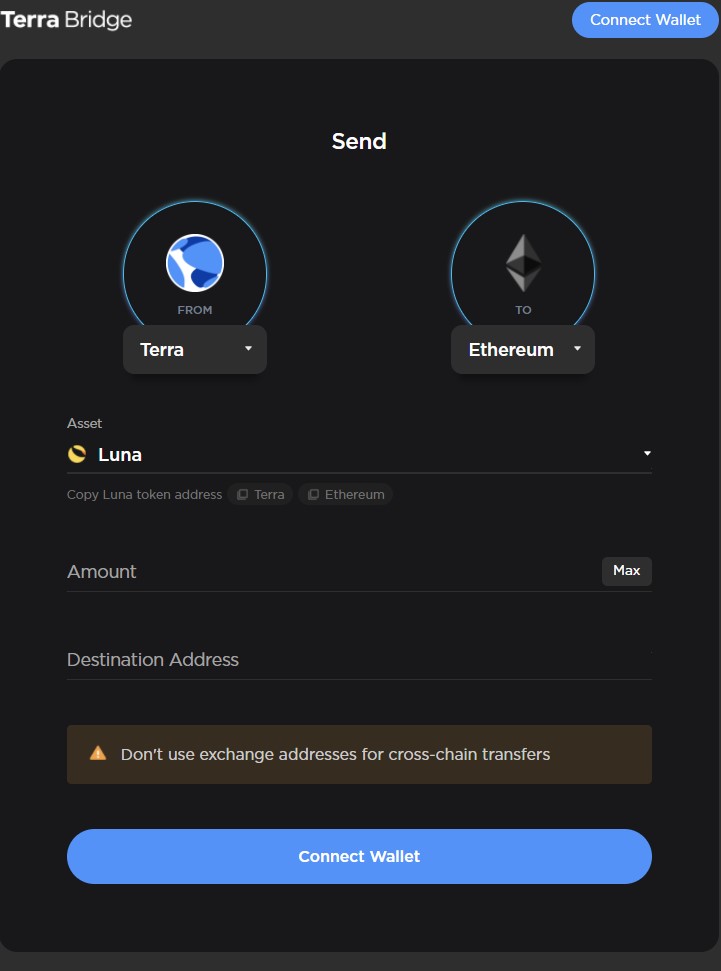
Moreover, the bridge currently supports only 4 networks: Terra, Binance Smart Chain, Ethereum, and Harmony with certain wallets:
- Terra- Terra station Extension, Terra station(mobile) via WalletConnect
- Ethereum- Metamask, Coinbase wallet, WalletConnect
- Binance Smart Chain- Binance Chain wallet, Metamask
- Harmony- Metamask, Coinbase wallet, WalletConnect
Note: In this case, we will use the bridge to transfer assets from Terra to Binance smart chain. Also, we are using the bridge for the Chromium browser, so for the Terra network, users can connect with the Terra station wallet. Finally, we will use LUNA tokens for this process.
Now, let’s get into the guide:
How To Use The Terra Bridge
These are the steps you need to follow to use the Terra Bridge
- Connect your wallet and select the destination network: You can connect with any of the above-mentioned wallets to work with the supporting networks. Then, you can select the asset that you wish to transfer. For Terra-Binance Smart Chain, the bridge supports a huge number of tokens to transfer.
- Enter the amount and the destination wallet address: You can select the token (UST, LUNA) that you wish to spend for paying the network fee.
Once you fill in these details, click on Next. The bridge will finally show you the network charges, shuttle fee, and the approximate amount that you will receive at the end of the process.
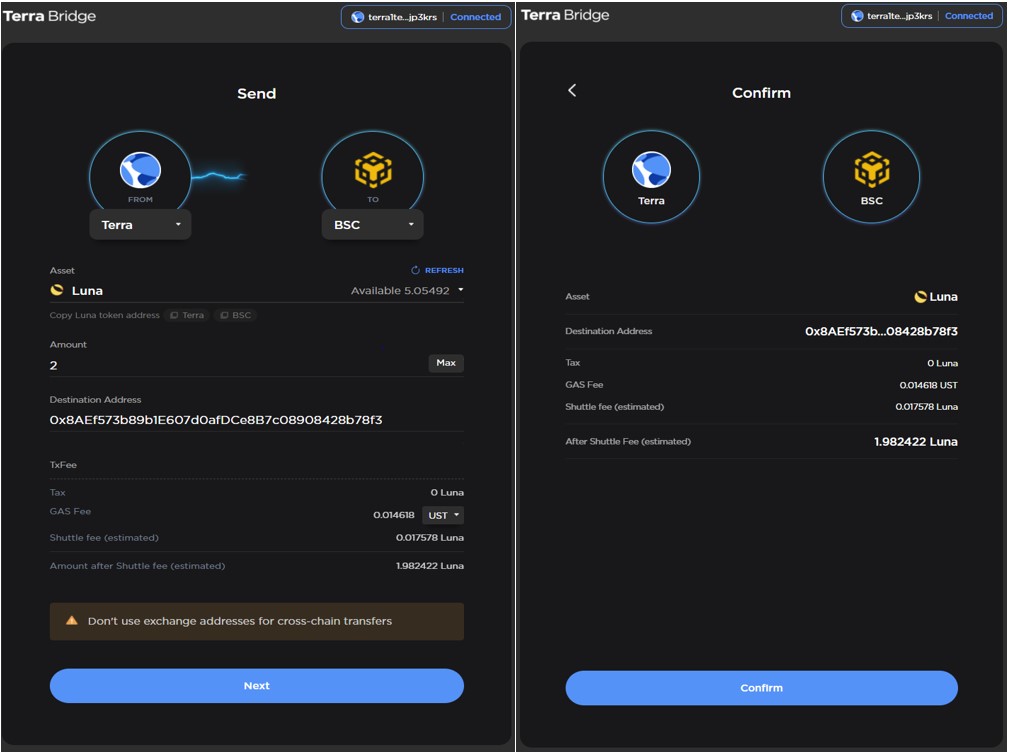
If you are satisfied with the details, then click on Confirm. Then, a transaction will be generated on your Terra station wallet. Confirm it by giving your wallet’s password.
Once it is successful, you will receive a completion message on your screen (see below screenshot).
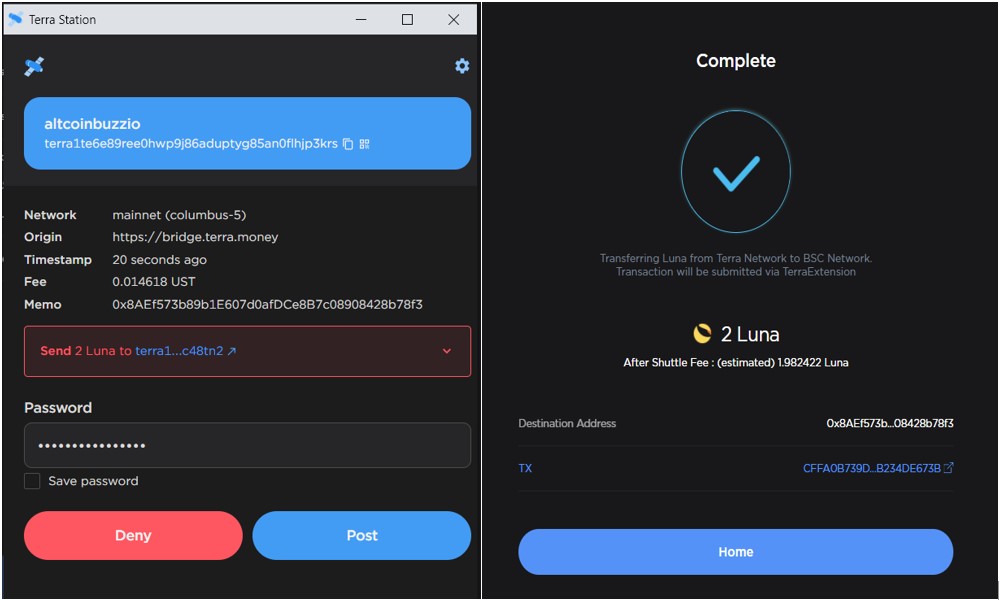
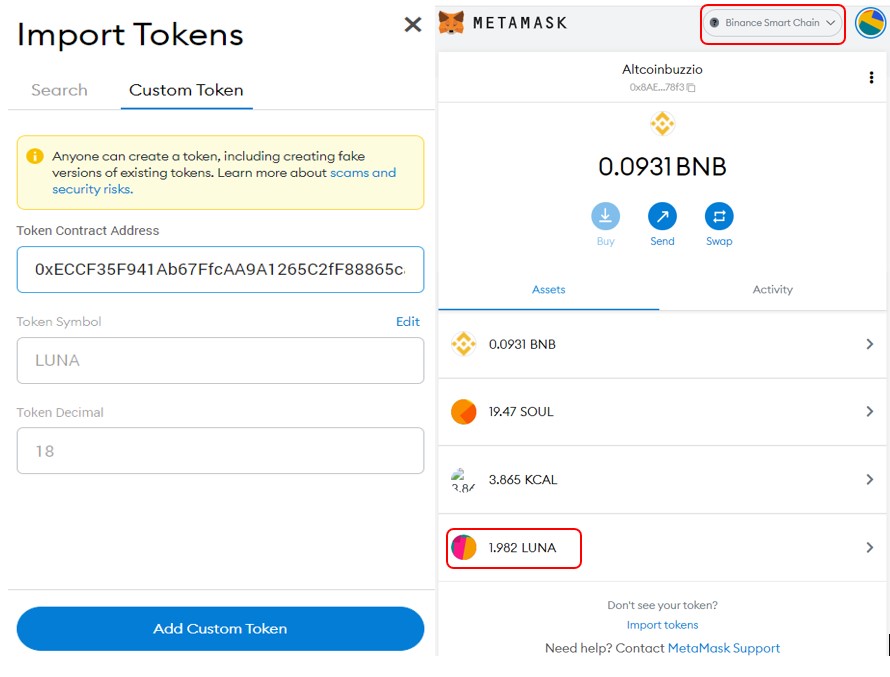
3. Add LUNA Token In Destination Wallet: For this process, we have connected our Metamask wallet to work with the BSC network. To see the desired LUNA token in your Metamask wallet, you have to manually add the token contract address.
To add the token, click on Import Tokens and add the token address there. You can get the token address from the field Copy LUNA Token Address field (see screenshot above). You can copy and paste this address in the Import Tokens field to get your LUNA balance in the destination BSC network.
Users can follow the same steps to transfer supporting tokens among the different supporting networks.
Join us on Telegram to receive free trading signals.
For more cryptocurrency news, check out the Altcoin Buzz YouTube channel.
Next up

Super League Holders Approve Metaplanet's 2,100 BTC Investment
Super League stockholders approved the Metaplanet deal that hands the company 2,100 Bitcoin and control. The transaction is expected to close in Q4 2026.
 BTC
BTCRelated
More in Crypto NewsRelated
Bitcoin ETFs Draw $1.07B in Three Days, Short of Rally-Era Pace
BTC
Swiss Regulator Approves First Retail Bitcoin ETF, Bends Fund Rules
BTC
JPMorgan Gives Bitcoin a 10% Annual Return in Long-Term Outlook
BTC
Tron and Starknet Ship Quantum Defenses as Bitcoin Debates
 TRX
TRX STRK
STRK